A node.js CLI utility generating a tree representation (treeview) of a folder structure including its contained files and subfolders.






This CLI tool requires node.js or a compatible JavaScript runtime environment to execute successfully. npm, pnpm or yarn may be required as well, in case you'd like to install the tool manually and/or to modify the source code.
This is the recommanded and easiest approach.
-
Install using
pnpm(see below),yarnornpm:pnpm add --global @khatastroffik/treefolder
-
start using the CLI tool from any directory:
# show treeview of the current directory
tfold
# or show treeview of any directory
tfold <some-path-to-be-used-as-tree-root>
Note: you may configure the tool using some options as needed. See the Features list.
- Auto "root folder"
- Auto "ignore paths"
- Sort leaves "folders first"
- Styled output
- Version information
- Verbose output
If not specified as a command line argument, the "root folder" of the tree is set to the current working directory aka ..
This tool is intentionally ignoring i.e. filtering out a few folder or file items by default and won't proceed with such ignored items i.e. those won't be visible in the resulting treeview.
The following paths (within the root folder) are ignored by default: node_modules , dist, build, .git, .husky\_, logs, .angular and coverage.
Notes:
- Glob-syntax is not supported at the moment. The ignored paths are matching real folder paths, starting within i.e. resolved into the root folder.
- This filtering cannot be disabled or modified at the moment. Feel free to edit the ignored paths/items directly in the source code of the tool, when suitable.
By default, the list i.e. the leaves of the treeview are sorted following the "folders first" principle: All the folders are listed first, then all the files. All items are alphabetically sorted. This apply at any depth within the tree structure.
This behavior can be disabled using the command line argument --unsorted. In this case, all items are sorted the way the operating system does e.g. sorted by their names, regardless of their type (directory or file).
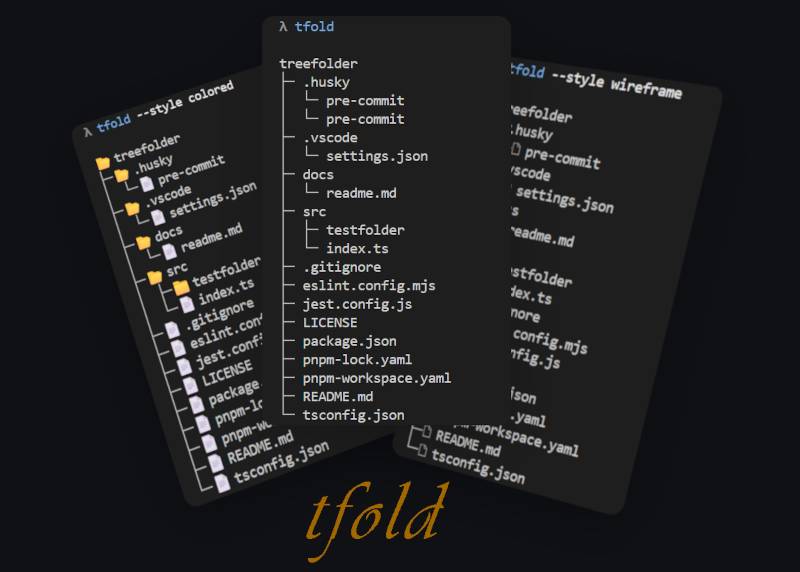
The treeview i.e. tree representation can be generated and displayed using 4 different styles: none (default), black, wireframe or colored.
The style can be defined using the command line argument --styleor -s like so: --style <name of the style>.
→ Examples of styled output can be found in the additional documentation: Styled output examples
Note: some environments i.e. shells may not display the symbols (which are represented using specific unicode code points like U+1F5BF or U+1F5C1) properly. Try to change the font used in the shell in order to display the correct unicode symbols.
Use the command line argument --version or -v to display the version information about the tool.
When the flag i.e. command line argument --verbose is defined/set, then a few more information will be displayed together with the tree representation.
-
Clone (e.g. using
git) or download this repository locally in order to make this tool available in your environment.gh repo clone khatastroffik/treefolder # or git clone https://github.com/khatastroffik/treefolder.git -
Navigate to the repo folder:
cd treefolder
-
Install the (dev-) dependencies using your favorite package manager and transpile the TypeScript source code into a JavaScript module.
# first install the development dependencies
pnpm install
# then transpile the source code to javascript
pnpm build
-
Use your favorite package manager to install the tool globally. For example:
npm install -g
# or (YES, TWICE IN A ROW!)
pnpm link --global
pnpm link --global
Note: pnpm link lacks of refinements (!) as of v10.x, but this seems to work well, despite the warnings...
-
Use the CLI tool alias
tfold. E.g.:# in any directory/folder simply run tfold # you may use additional arguments too, in order to configure the output tfold --verbose -s colored /c/DEV/a-folder-to-be-scanned # or tfold c:\\DEV\\another-folder --unsorted --style wireframe
Within the local clone/copy of the treefolder repository, you may:
pnpm tsx src\index.ts
# or
pnpm tsx src\index.ts [root-path] [options]
# or run and watch for code changes
pnpm dev
or
# at least once
pnpm build
# then
pnpm start
# or
node .
# or
node . ..\..\some-folder
# or
node dist\index.js ..\..\some-folder
# or
node dist\index.js --style=colored --unsorted --verbose c:\test\some-other-folder
┌─────────────────────────────────────────────┐
|                                             |
   ╭━┳━╭━╭━╮╮
   ┃┈┈┈┣▄╋▄┫
   ┃┈┃┈╰━╰━━━━━━╮            "K11K"
   ╰┳╯┈┈┈┈┈┈┈┈ ◢█◣    a very pragmatic dog
    ┃┈┈┈┈┈┈┈┈┈┈████
    ┃┈┈┈┈┈┈┈┈┈┈◥█◤
    ┃┈┈┈┈╭━┳━━━━╯
    ┣━━━━━━┫
|                                             |
└──────────── made by khatastroffik ──────────┘