A lightweight VS Code extension that shows git blame information inline in your code editor without cluttering your interface.
- Shows git blame information (author, time, and commit hash) directly inline at the end of the current line
- Supports both automatic display when selecting lines and manual triggering via command
- Configurable display duration (temporary or permanent)
- Non-intrusive UI that doesn't interfere with your coding workflow
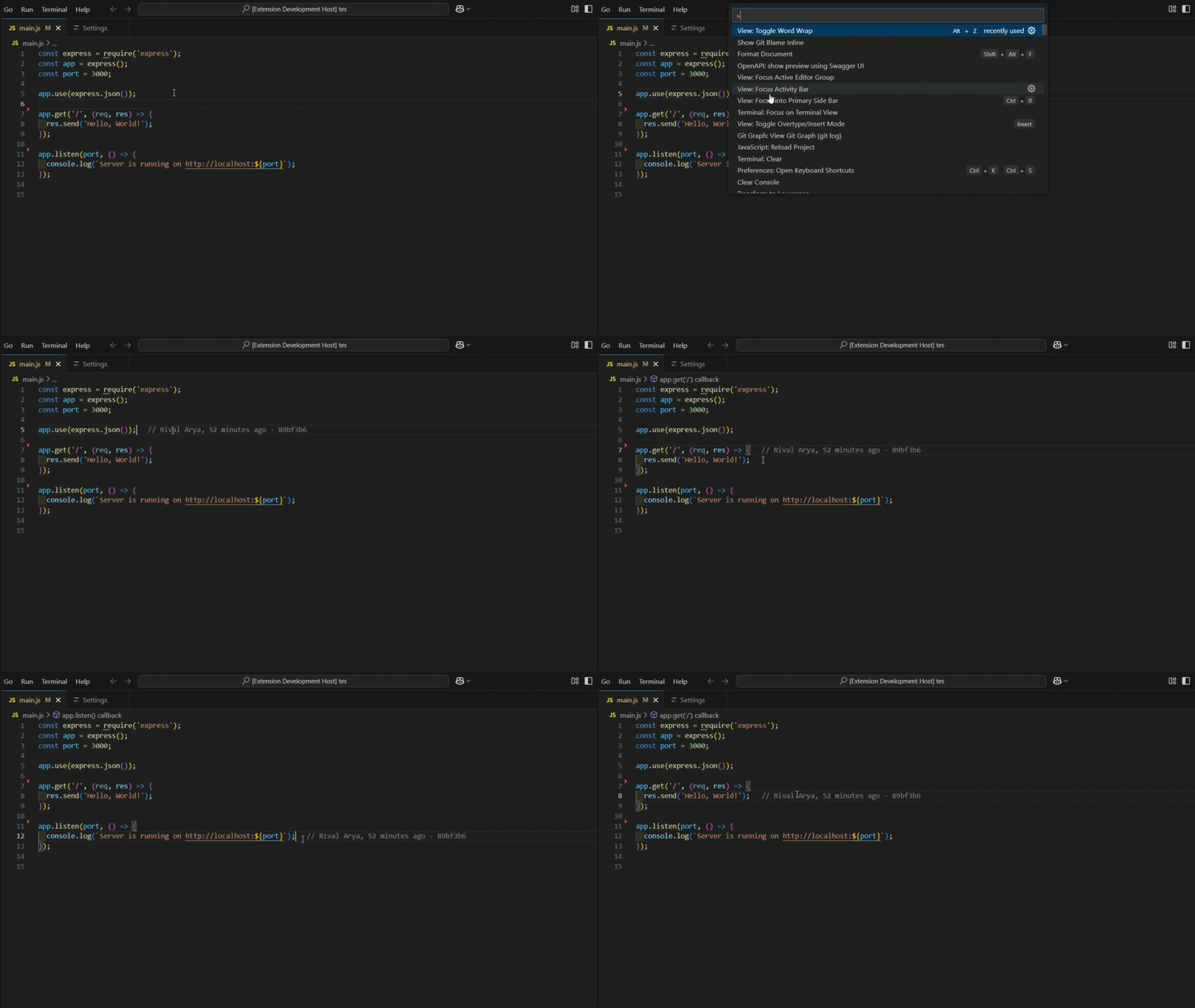
- Open VS Code
- Go to Extensions view (Ctrl+Shift+X / Cmd+Shift+X)
- Search for "Git Blame Inline"
- Click Install
By default, the extension will automatically show git blame information whenever you select a line in your editor.
You can also manually trigger git blame for the current line:
- Via Command Palette (Ctrl+Shift+P / Cmd+Shift+P):
Show Git Blame Inline - Default keyboard shortcut: None (you can assign your own in keyboard shortcuts settings)
This extension provides the following settings:
| Setting | Description | Default |
|---|---|---|
gitBlameInline.displayDuration |
How long to display the blame information in milliseconds (0 for permanent display) | 5000 |
gitBlameInline.autoShowOnSelect |
Automatically show blame information when selecting a line | true |
You can modify these settings in your VS Code settings.json file:
{
  "gitBlameInline.displayDuration": 10000,  // 10 seconds
  "gitBlameInline.autoShowOnSelect": false  // Disable automatic display
}- Git must be installed and available in your PATH
- The file must be part of a Git repository
- Enhanced security by replacing shell execution with
execFileto prevent command injection - Standardized output parsing using the
--line-porcelainflag - Added logo
- Improved observability by adding
[Git Blame Inline]prefixed logs for debugging
- Fix the issue where the extension does not run after installation
- Only show git blame when the user moves the cursor up or down, making it more lightweight
- Initial release of Git Blame Inline
- Basic functionality with automatic and manual modes
- Configurable display duration
Contributions are welcome! Please feel free to submit a Pull Request.
- Fork the repository
- Create your feature branch:
git checkout -b my-new-feature - Commit your changes:
git commit -am 'Add some feature' - Push to the branch:
git push origin my-new-feature - Submit a pull request
This project is licensed under the MIT License - see the LICENSE file for details.